5 Best Ergonomic Keyboard Trays for Ultimate Comfort and Productivity

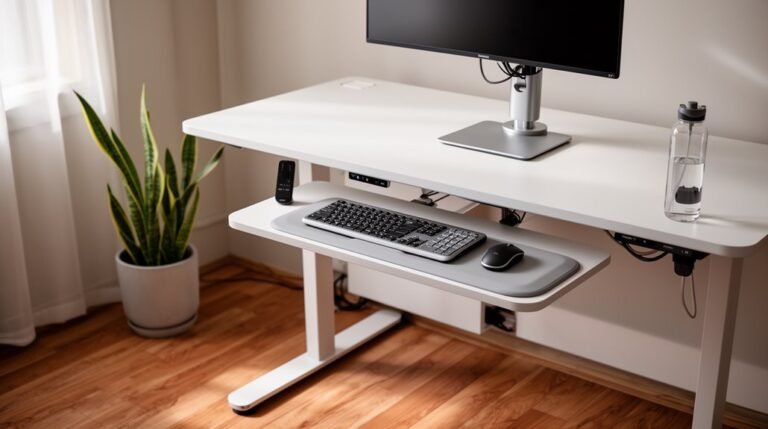
For ultimate comfort and productivity, consider these top five ergonomic keyboard trays: the VIVO Large Keyboard Tray, EUREKA ERGONOMIC Height Adjustable Tray, Klearlook Adjustable Tray, EUREKA ERGONOMIC Adjustable Tray, and the VIVO Office Chair Mounted Tray.
Each of these trays boasts unique features designed to enhance your typing experience. You can find options with adjustable heights, sturdy construction, and integrated wrist support.
Choosing the right ergonomic keyboard tray can significantly reduce strain and improve your workspace efficiency.
Take the time to explore what each one has to offer for maximum benefit.
VIVO Large Keyboard Tray Under Desk Pull Out (MOUNT-KB05E)
If you’re looking to maximize your workspace while ensuring comfort during long hours of typing, the VIVO Large Keyboard Tray Under Desk Pull Out (MOUNT-KB05E) is an excellent choice. This 27” x 11” tray easily holds your keyboard, mouse, and accessories beneath the desktop, saving valuable space. Its ergonomic design promotes comfortable typing angles, relieving wrist and shoulder strain. With a sturdy C-clamp system, you can securely attach it to desks up to 1.25” thick without causing damage. Plus, installation is straightforward with the included hardware. This tray supports up to 11 lbs, providing convenience and durability for your work setup.
Best For: Those seeking an ergonomic solution to enhance their workspace and improve typing comfort while saving desk space.
Pros:
- Ergonomic design promotes comfortable typing angles, reducing wrist and shoulder strain.
- Space-saving tray holds keyboard, mouse, and accessories underneath the desk.
- Easy installation with provided hardware and sturdy C-clamp system ensures secure attachment.
Cons:
- Not suitable for desks with beveled edges.
- Limited weight support of 11 lbs may not accommodate heavier keyboards or accessories.
- Compatibility is restricted to desks up to 1.25” thick.
EUREKA ERGONOMIC Height Adjustable Mouse & Keyboard Tray Under Desk
The EUREKA ERGONOMIC Height Adjustable Mouse & Keyboard Tray is perfect for anyone looking to enhance their workspace comfort, especially gamers and home office professionals. With dimensions of 28×10 inches, this tray offers a slide-out, swivel, and tilt design for ergonomic positioning. You can easily adjust the height and enjoy 360° horizontal rotation and a 43° vertical tilt. Its gravity self-locking mechanism guarantees stability while you work. Compatible with various desk materials, it also features a lip for wrist support, helping keep your keyboard in place. This tray is an ideal solution for organizing your workspace efficiently.
Best For: The EUREKA ERGONOMIC Height Adjustable Mouse & Keyboard Tray is best for gamers and home office professionals seeking ergonomic workspace solutions.
Pros:
- Ergonomic Design: Offers customizable height, tilt, and rotation for optimal comfort.
- Durable Material: Made with a carbon fiber texture for long-lasting use.
- Space-Saving: Efficiently organizes workspace by accommodating essential devices.
Cons:
- Compatibility Limitations: Not suitable for desks made of plastic, stone, or glass.
- Minimum Thickness Requirement: Requires a desktop thickness of at least 0.71 inches.
- Specific Desk Dimensions: Recommended desk dimensions may not fit all setups.
Klearlook Adjustable Keyboard Tray for Above and Under Desk Use
For those seeking a comfortable typing experience without sacrificing desk space, the Klearlook Adjustable Keyboard Tray is an excellent choice. This versatile tray supports both above and under-desk use, measuring 24.4″×10″. With 360° rotation, 237° vertical adjustment, and 180° tilt, you can find the perfect angle to reduce neck strain and alleviate wrist pressure. It also features a storage drawer for small items, a dedicated phone slot, and a built-in headphone hanger, keeping your workspace organized. Constructed from robust materials, it minimizes wobbling and enhances stability, ensuring a reliable foundation for all your typing tasks.
Best For: Individuals looking for an ergonomic and space-saving keyboard solution for home, office, or gaming setups. In the search for the best ergonomic keyboards for 2025, several models stand out for their innovative designs and user-friendly features. These keyboards not only enhance comfort during long hours of typing but also promote better posture and reduce strain. Whether you’re a casual user or a dedicated gamer, investing in the right ergonomic keyboard can lead to significant improvements in your overall productivity and health. In addition to selecting the best ergonomic keyboards for 2025, it’s equally important to choose the best ergonomic wrist rests for comfort. These wrist rests can provide crucial support, ensuring that your arms are aligned properly while you type or navigate your computer. By complementing your keyboard choice with a well-designed wrist rest, you can further enhance your workspace for ultimate comfort and efficiency.
Pros:
- Ergonomic design with multiple adjustment angles to enhance comfort and reduce strain.
- Includes storage features such as a drawer, phone slot, and headphone hanger for an organized workspace.
- Durable construction that minimizes wobbling and provides a stable typing surface.
Cons:
- May require assembly, which could be inconvenient for some users.
- Size may not accommodate larger keyboards or equipment comfortably.
- Adjustment mechanisms may take time to get used to for optimal positioning.
EUREKA ERGONOMIC Adjustable Keyboard Tray
Looking to enhance your workspace comfort? The EUREKA ERGONOMIC Adjustable Keyboard Tray is designed just for you, offering a height-adjustable range of 5.8” along with 360° rotation and 43° tilt. You’ll easily find your ideal typing position, promoting better posture and reducing fatigue. Measuring 25×9.13 inches, it fits most keyboards and can be slid under your desk for optimal organization. With its durable construction supporting up to 6.6 LBS, it’s perfect for typing or gaming. Plus, the included wrist rest and smooth mouse pad guarantee a comfortable experience. Enjoy 24/7 customer support for any questions!
Best For: Those seeking an ergonomic solution for typing and gaming, enhancing comfort and workspace organization.
Pros:
- Height-adjustable with a range of 5.8” for optimal typing position.
- Durable construction supports a weight capacity of 6.6 LBS, ensuring stability for various devices.
- Includes a wrist rest and smooth mouse pad to enhance user comfort during extended use.
Cons:
- Requires a minimum desk size of 19.69×39.5×29.1 inches, which may not fit all workspaces.
- Desktop thickness must be at least 0.71 inches for compatibility, limiting options for some desks.
- Installation may require time and effort, especially for those unfamiliar with assembly.
VIVO Office Chair Mounted Keyboard and Mouse Tray (MOUNT-KB18CP)
Designed for gamers and professionals who spend long hours at their desks, the VIVO Office Chair Mounted Keyboard and Mouse Tray (MOUNT-KB18CP) offers an innovative solution for ergonomic comfort. This tray features a spacious 26 x 12-inch platform that fits most keyboards, while wrist padding enhances your typing experience. The steel arm support easily attaches to your chair’s bottom tube, allowing for adjustable tilt and a full 360° rotation. You can customize the height by moving the tray up to 5.8 inches. Plus, it’s perfect for both left and right-handed users, providing ultimate convenience without needing a desk attachment.
Best For: Gamers and professionals seeking ergonomic comfort during long hours of computer use.
Pros:
- Spacious platform accommodates most standard and oversized keyboards for versatile use.
- Adjustable tilt and 360° rotation allow for personalized positioning and comfort.
- Wrist padding enhances typing comfort, reducing strain during extended use.
Cons:
- Limited to specific chair sizes (1.7 to 2 inches in diameter) may not fit all chairs.
- May require adjustment time to find the perfect position for individual users.
- Potential instability if not securely attached to the chair’s bottom tube.
Factors to Consider When Choosing Ergonomic Keyboard Trays
When choosing an ergonomic keyboard tray, you’ll want to take into account several key factors to guarantee comfort and efficiency. Adjustability and compatibility with your desk are essential for a proper fit, while weight capacity and surface area dimensions will impact your setup. Finally, think about the ease of installation to get your workspace up and running smoothly.
Adjustability and Ergonomics
To confirm you find the perfect ergonomic keyboard tray, consider key features that enhance adjustability and promote better posture. Look for trays that offer height adjustability, ideally providing a range of up to 5.8 inches to suit various user preferences. Features like 360° horizontal rotation and vertical tilt angles of up to 43° help you find your best typing position. Don’t overlook wrist supports, which reduce fatigue and prevent slippage during long sessions. Verify the tray allows for smooth pull-out functionality, making it easy to access your keyboard and mouse while keeping your workspace organized. Finally, a sturdy construction is essential; many trays support weights of 11 lbs or more, confirming stability and reliability during use.
Compatibility With Desks
Choosing the right ergonomic keyboard tray involves guaranteeing compatibility with your desk. First, check the desk thickness; many trays need a minimum thickness of 0.71 inches to 1.25 inches. Next, consider the material of your desk. Some trays are designed specifically for wood or MDF and may not work well on plastic, stone, or glass surfaces. Don’t forget to measure the overall dimensions of the tray to verify it fits comfortably without blocking your workspace. Additionally, check that the mounting system, whether clamps or other methods, aligns with your desk’s structure for secure installation. Finally, make certain the tray design accommodates any beams or structural elements of the desk to allow effective use.
Weight Capacity Considerations
A solid understanding of weight capacity is crucial for selecting the right ergonomic keyboard tray. This factor determines how much load the tray can support without losing stability. Most trays have a weight capacity ranging from 6.6 lbs to 11 lbs, which comfortably accommodates standard keyboards and mice. Exceeding this limit can lead to bending or instability, creating safety hazards. When evaluating weight capacity, consider the combined weight of your keyboard, mouse, and any additional accessories you might use. Additionally, look for trays with a sturdy mechanical structure and quality materials, as these features enhance weight-bearing capabilities and overall durability. Choosing the right tray guarantees safety and maintains peak functionality in your workspace.
Surface Area Dimensions
Selecting the right surface area dimensions for your ergonomic keyboard tray is essential for comfort and functionality. Aim for a width of at least 25 inches and a depth of 9 inches to comfortably accommodate your keyboard and mouse. If you want extra space for accessories like a tablet, consider trays around 28 inches wide. The depth should ideally be between 10 to 11 inches to guarantee proper wrist positioning and support while you type. Additionally, the tray should extend 8 to 10 inches from the desk edge, promoting ergonomic typing angles and reducing wrist strain. Finally, verify the overall size fits your desk, with a minimum thickness of about 0.71 inches for stability and compatibility.
Installation and Setup
When it comes to installation and setup of ergonomic keyboard trays, several key factors can make a significant difference in your experience. First, verify compatibility with your desk by checking the maximum thickness, which is typically up to 1.25 inches. Look for trays that offer easy-to-follow installation hardware and instructions to reduce assembly time. Some trays may also require specific desk surfaces, like wood or MDF, so confirm this to avoid issues. Adjustable mounting systems, such as C-clamps or dual mounts, allow for secure attachment and repositioning. Finally, make certain the tray’s dimensions fit your workspace, as some models may extend beyond the desk edge or have specific clearance requirements for peak functionality.
Additional Features Offered
Several essential features can enhance your experience with ergonomic keyboard trays. Height adjustability is vital, allowing you to customize your typing position and reduce wrist and shoulder strain. Look for trays with 360° horizontal rotation and vertical tilt options for flexible ergonomic alignment during use. Many designs also incorporate wrist rests or padding, which boost comfort and prevent slippage, making your typing experience more pleasant. Additionally, trays with storage solutions like drawers or dedicated device slots help keep your workspace organized and clutter-free. Finally, guarantee durability and stability by selecting trays made from high-quality materials that can support the weight of your keyboard and other devices, ensuring long-lasting performance.
Frequently Asked Questions
How Do Ergonomic Keyboard Trays Improve Wrist Posture?
Ergonomic keyboard trays improve wrist posture by allowing you to position your keyboard at the ideal height and angle. This setup keeps your wrists straight and reduces strain during typing. You can adjust the tray to fit your unique body mechanics, promoting a more natural hand position. By using these trays, you’ll notice less discomfort and fatigue, ultimately enhancing your productivity and comfort during long hours at your desk.
Can a Keyboard Tray Fit All Desk Sizes?
Can a keyboard tray fit all desk sizes? Not necessarily. While many trays are adjustable and designed to accommodate various surfaces, the fit depends on your desk’s dimensions and design. You’ll want to measure your desk and choose a tray that suits your setup. If your desk is particularly small or uniquely shaped, you might need a custom solution. Always consider your workspace to guarantee ideal comfort and functionality.
What Materials Are Best for Durable Keyboard Trays?
For durable keyboard trays, you’ll want materials like solid wood, metal, or high-quality plastic. Solid wood offers strength and stability, while metal provides a sleek, sturdy option that can handle weight. High-quality plastic is lightweight and resistant to wear, making it a practical choice for everyday use. Avoid flimsy materials that can warp or break easily. Ultimately, choose a material that suits your desk style and meets your durability needs.
Is Installation of Keyboard Trays Complicated?
Installing keyboard trays isn’t usually complicated, but it can feel overwhelming at first. You might find yourself staring at the instructions, wondering if you’ve got everything you need. However, once you gather your tools and break it down step by step, it becomes much easier. Most trays come with mounting hardware, and you’ll just need to follow the guidelines closely. Soon enough, you’ll have your setup ready, enhancing your workspace comfort.
How Do I Clean and Maintain My Keyboard Tray?
To clean and maintain your keyboard tray, start by unplugging your keyboard and removing any items on the tray. Wipe it down with a damp cloth and mild detergent, avoiding harsh chemicals. For stubborn stains, use a soft brush. Dry it thoroughly to prevent moisture damage. Regularly check for any loose screws or parts, tightening them as needed. Keeping it organized will also help maintain its functionality and appearance.
Conclusion
In your quest for comfort and productivity, investing in an ergonomic keyboard tray can be a game-changer. Each of the options we’ve explored offers unique features tailored to your needs, ensuring a smoother workflow. By prioritizing your workspace ergonomics, you’re setting the stage for success. Remember, a well-supported posture is like a sturdy bridge—it’s essential for crossing the turbulent waters of daily tasks. Choose wisely, and let your productivity soar!