The Ultimate Buying Guide: 5 Best Monitor Arms for Ergonomic Workspaces
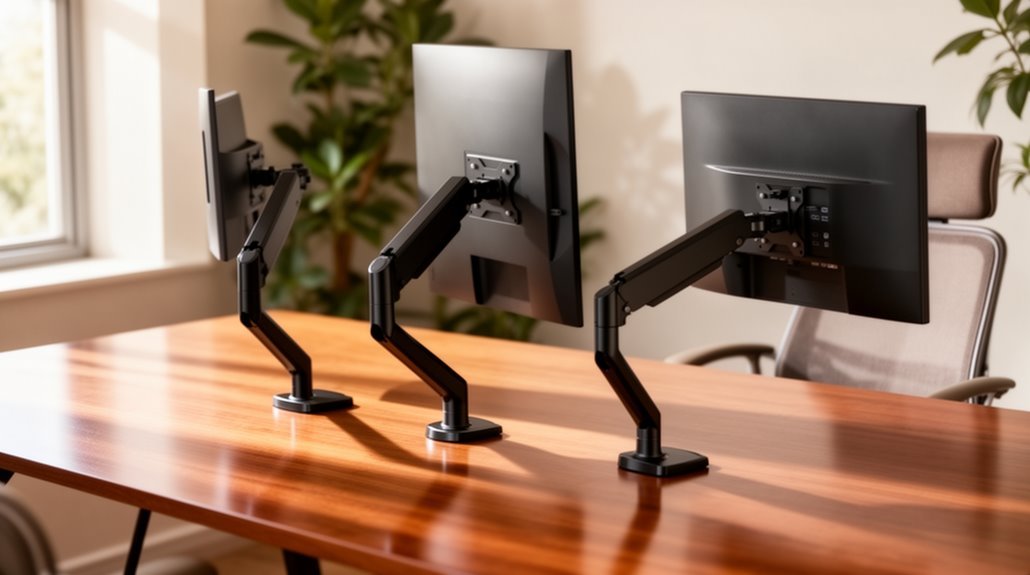
If you want to boost your workspace ergonomics, investing in a good monitor arm is key. A quality monitor arm can greatly enhance your comfort and productivity by allowing you to adjust your screen’s position easily.
The WALI Dual Monitor Stand supports 17-32 inch screens, making it a versatile choice for those with multiple displays.
On the other hand, the HUANUO Single Monitor Arm is designed to accommodate 13-49 inch displays, providing flexibility for a variety of monitor sizes.
For smaller monitors, the Amazon Basics Gas Spring Arm is an excellent option. It allows for smooth adjustments and optimal positioning.
If you need to maximize vertical space, consider the HUANUO Vertical Mount, which effectively stacks two screens.
Lastly, the HUANUO Heavy Duty Monitor Arm is ideal for ultrawide setups, ensuring stability and support for larger monitors.
Stick around to discover the essential factors to help you choose the best monitor arm for your needs!
WALI Dual Monitor Stand for 17-32 inch Computer Screens
If you’re looking to enhance your ergonomic workspace, the WALI Dual Monitor Stand is an excellent choice for those using 17-32 inch screens. This stand supports up to 22 lbs and features VESA 75x75mm and 100x100mm mounting holes for easy setup. With dynamic adjustments, you can swivel, tilt, and rotate your monitors to reduce neck and eye strain during long hours. Its maximum extension of 19.3 inches and adjustable height of 17.3 inches allow for versatile positioning. Plus, you can choose between a C-clamp or hole base for secure mounting, making it ideal for any desk configuration.
Best For: Individuals seeking to improve their ergonomic workspace with dual monitor setups for enhanced productivity and comfort.
Pros:
- Dynamic adjustments allow for smooth swivel, tilt, and rotation, catering to various viewing angles and reducing strain.
- Maximum extension and adjustable height provide flexibility in monitor positioning, accommodating different work styles.
- Multiple mounting options (C-clamp and hole base) ensure stability and compatibility with various desk configurations.
Cons:
- Weight limit of 22 lbs may not accommodate heavier monitors or specialized setups.
- Installation may require some technical knowledge, which could be challenging for less experienced users.
- Limited color options (only available in black) may not match all office aesthetics.
HUANUO Single Monitor Arm for 13-49 inch Screens
The HUANUO Single Monitor Arm is ideal for anyone from students to professionals seeking a more ergonomic workspace, as it supports screens ranging from 13 to 49 inches. This durable arm holds monitors weighing between 4.4 and 26.4 lbs and offers impressive adjustability with tilt, swivel, and rotation features. You can easily customize your setup with 21.1 inches of height adjustment and 25.6 inches of extension. Plus, the built-in USB 3.0 port enhances functionality, while integrated cable management keeps your desk clutter-free. Installation is straightforward, making it a perfect choice for solid wood desks or various workstation styles.
Best For: The HUANUO Single Monitor Arm is best for students, remote workers, and professionals seeking an ergonomic and space-efficient workspace.
Pros:
- Offers extensive adjustability with tilt, swivel, and rotation for optimal viewing angles.
- Built-in USB 3.0 port for fast data transfer and convenient charging.
- Integrated cable management saves desk space and reduces clutter.
Cons:
- May require a sturdy desk without crossbars for optimal installation and stability.
- Limited weight capacity (up to 26.4 lbs) may not accommodate heavier monitors.
- Installation might be challenging for users inexperienced with mounting equipment.
Amazon Basics Gas Spring Single Computer Monitor Arm Mount
For those seeking an adaptable solution to enhance their workspace, the Amazon Basics Gas Spring Single Computer Monitor Arm Mount stands out with its impressive weight capacity and adjustable features. This mount accommodates monitors from 15 to 27 inches and supports weights between 4.4 and 15.4 pounds. You can easily adjust the weight by rotating the arm, ensuring maximum support. With VESA compatibility and an array of movement options—tilt, swivel, rotation, and extension—this monitor arm provides versatility. Plus, its cable management system keeps your workspace tidy, making installation straightforward with the included C-clamp and grommet base mount.
Best For: Individuals looking for a versatile and adjustable monitor mount to optimize their workspace ergonomics. Creating an ergonomic workspace setup tips can significantly enhance comfort and productivity during long hours at the computer. Paying attention to factors such as desk height, chair support, and monitor positioning will help prevent strain and improve overall well-being. It’s essential to regularly assess and adjust your workspace to maintain an effective and supportive environment.
Pros:
- Supports a wide range of monitor sizes from 15 to 27 inches, accommodating various setups.
- Offers extensive adjustability with tilt, swivel, rotation, and extension features for personalized viewing angles.
- Includes a cable management system to keep your workspace neat and organized.
Cons:
- Installation may require precise measurements for desk thickness and hole diameter to ensure proper fit.
- Weight adjustment can be cumbersome, needing multiple turns to achieve desired support.
- Limited to supporting monitors weighing between 4.4 to 15.4 pounds, which may exclude heavier models.
HUANUO Vertical Dual Monitor Mount for 17 to 32 Inch Monitors
Designed for those who use two monitors simultaneously, the HUANUO Vertical Dual Monitor Mount elevates your workspace by allowing screens from 17 to 32 inches to be stacked vertically. It supports a weight capacity of 17.6 lbs per monitor, ensuring stability. With its C clamp, installation is a breeze, fitting desks up to 3.14 inches thick. The mount enhances your ergonomic setup, reducing neck and back strain while increasing work efficiency. Enjoy full adjustability with -45 to +45 degrees tilt, -60 to +60 degrees swivel, and 360 degrees rotation for ideal viewing angles, keeping your workspace organized and clutter-free.
Best For: Professionals and gamers who require dual monitors for increased productivity and ergonomic comfort.
Pros:
- Space-saving design allows for a clutter-free workstation by stacking monitors vertically.
- Full adjustability with tilt, swivel, and rotation provides optimal viewing angles for various tasks.
- Easy installation with a C clamp that fits desks up to 3.14 inches thick, ensuring a stable setup.
Cons:
- Weight capacity of 17.6 lbs per monitor may not accommodate heavier screens.
- Limited compatibility with monitors that do not support VESA 75x75mm or 100x100mm mounting patterns.
- Stacked configuration may not be suitable for all users, as some may prefer side-by-side arrangements.
HUANUO Heavy Duty Monitor Arm for Ultrawide Screens
Offering impressive support for ultrawide monitors, the HUANUO Heavy Duty Monitor Arm is perfect for professionals and gamers alike who need flexibility and stability. It accommodates 17–49 inch flat or curved displays, holding up to 40 lbs with ease. You’ll appreciate the adjustable height, tilt, and swivel options, allowing you to customize your viewing experience for comfort. Constructed from high-strength aluminum alloy, it’s built to last, having passed rigorous load tests. Installation is a breeze with clear instructions, and side tension adjustments can be made effortlessly. Elevate your workspace and enhance productivity while reducing eye strain with this reliable monitor arm.
Best For: Professionals and gamers seeking a reliable and flexible monitor arm for ultrawide screens that enhances comfort and productivity.
Pros:
- Supports a wide range of monitor sizes and weights, accommodating both flat and curved displays.
- Excellent adjustability features, including tilt, swivel, and rotation, for a customized viewing experience.
- Durable construction from high-strength aluminum alloy ensuring long-lasting reliability and stability.
Cons:
- May require more desk space due to the arm’s extension capabilities.
- Limited to VESA mounting patterns of 75x75mm or 100x100mm, which may not fit all monitors.
- Installation may be challenging for those unfamiliar with mounting hardware.
Factors to Consider When Choosing a Monitor Arm Buying Guide
When choosing a monitor arm, you need to take into account several key factors to make certain it fits your workspace. Think about your monitor’s size and weight, as well as how adjustable you want the arm to be. Don’t forget to check the mounting options and the build quality to assure durability and stability. For those looking for the best monitor arms for heavy displays, it’s essential to ensure that the arm can support the weight without compromising performance. Many options on the market offer heavy-duty construction, making them ideal for larger screens. Additionally, consider features like cable management and range of motion to enhance your overall setup and workspace efficiency.
Monitor Size Compatibility
Choosing the right monitor arm for your workspace hinges on understanding monitor size compatibility. Start by checking the specific size range supported by the arm, as most options accommodate monitors between 13-49 inches or 17-32 inches. Verify your monitor’s weight aligns with the arm’s capacity, typically ranging from 4.4 lbs to 40 lbs. Don’t forget to confirm VESA mounting compatibility, with most monitors following 75x75mm or 100x100mm standards for attachment. Additionally, consider the adjustment features of the arm, like tilt, swivel, and rotation, to enhance your viewing angles. Finally, make certain the monitor arm fits your desk dimensions and allows for easy installation without disrupting your workspace functionality.
Weight Capacity Requirements
Understanding weight capacity requirements is essential for selecting the right monitor arm, as it directly impacts both safety and functionality. Make certain your monitor’s weight falls within the arm’s specified capacity, which typically ranges from 4.4 lbs to 40 lbs. Check the maximum weight limit to prevent any damage or instability. Some monitor arms come pre-set for specific weights, like 15.4 lbs, and can be adjusted for lighter monitors easily. If you’re using dual or multiple monitors, consider their combined weight to guarantee it doesn’t exceed the arm’s capacity. Finally, verify that the monitor arm accommodates both the size and weight of your monitors for peak performance and safety in your workspace.
Adjustability Features Offered
Adjustability features are essential for enhancing your workspace and guaranteeing comfort during long hours of use. When selecting a monitor arm, look for models that offer a wide range of tilt options, like +85° to -30°, to minimize glare and accommodate various viewing angles. Swivel capabilities of ±90° or 180° are also important for adjusting the monitor’s position in shared or collaborative settings. Confirm the arm allows for 360° rotation to switch between landscape and portrait modes effortlessly. Height adjustment features that elevate your monitor up to 29.1 inches promote better ergonomics, reducing neck and back strain. Finally, check for extension capabilities of 20 inches or more to position your monitor at ideal distances for comfort and productivity.
Mounting Options Available
When it comes to monitor arms, the mounting options available can greatly impact your setup’s functionality and stability. You typically have two choices: C-clamps that attach to your desk’s edge or grommet mounts that fit through pre-drilled holes. C-clamps are quicker to install and ideal for non-drilled desks, while grommet mounts offer enhanced stability for drilled setups. Consider the thickness of your desk, as grommet mounts accommodate surfaces ranging from 0.39 to 4 inches. Additionally, verify your monitor arm supports the weight of your monitor and is compatible with VESA mounting patterns of 75x75mm or 100x100mm. Choosing the right mounting option can make a significant difference in your workspace ergonomics.
Build Quality and Materials
Choosing the right monitor arm involves considering the build quality and materials used in its construction. Look for monitor arms made from high-strength materials like aerospace-grade aluminum alloy; they can withstand daily adjustments and pass over 20,000 fatigue tests. Reinforced components, such as VESA heads and lock rings, enhance stability, especially for heavier monitors. A thicker arm design—about 20% thicker than standard models—provides extra support, reducing sagging risks. Verify the monitor arm has also passed rigorous testing, including 50,000 cycle motion tests and 3X load tests, to guarantee reliability. Finally, choose materials that promote a stable foundation, accommodating various desk thicknesses and providing secure mounting options to prevent accidents during use.
Cable Management Solutions
After ensuring your monitor arm boasts quality construction, the next aspect to evaluate is cable management solutions. Effective cable management can reclaim up to 30% more desk space by keeping cords organized and out of sight. Look for monitor arms that include integrated cable channels to prevent tangling and clutter, ensuring a sleek setup. Some models even feature built-in systems that let you route cables along the arm or within the mount, enhancing both aesthetics and functionality. Choosing monitor arms with these options can reduce wear and tear on cables, extending their lifespan while maintaining a professional appearance. Plus, easy access to well-designed management systems allows you to quickly adjust or replace cables without disassembling your entire setup.
Installation Ease and Support
Installing a monitor arm can greatly enhance your workspace, but ease of installation is essential for a hassle-free setup. First, consider the mounting options like C-clamp or grommet mounts, as they affect compatibility with different desk thicknesses. Look for arms that include all necessary hardware and clear, step-by-step manuals to simplify assembly. Adjustable features are also a plus, making it easier to fine-tune your monitor’s position after installation. Quick-install VESA heads can further expedite the process, allowing you to attach or remove monitors effortlessly. Finally, check for customer support or online resources that can assist you with any installation questions or troubleshooting, ensuring you get everything set up smoothly.
Ergonomic Design Considerations
How can you guarantee your monitor arm promotes a healthier workspace? Look for an arm that offers a wide range of adjustments, like height (up to 29.1 inches), tilt (up to +85°/-30°), and swivel (180°). These features help reduce neck and eye strain by accommodating your preferences. A monitor arm with a maximum extension of at least 20.5 inches allows you to position your screen at an ideal distance. If you use dual monitors, consider vertical stacking to keep screens at eye level and minimize strain. Built-in cable management systems can also help maintain an organized workspace. Finally, choose a product that supports VESA mounting patterns (75x75mm or 100x100mm) for easy compatibility with your monitors.
Frequently Asked Questions
Can Monitor Arms Accommodate Different Monitor Sizes and Weights?
Yes, monitor arms can accommodate different monitor sizes and weights. When choosing one, you should check the specifications for weight capacity and size compatibility. Most arms support a range of monitors, allowing you to adjust the height and angle for ideal viewing. It’s important to verify the arm you select can handle your specific monitor’s weight and dimensions for safety and functionality. You’ll enjoy a more ergonomic workspace once you find the right fit!
How Do I Install a Monitor Arm Properly?
Installing a monitor arm properly can feel intimidating, but it’s easier than you think. Start by securing the clamp or grommet mount to your desk, making sure it’s tight but not overly so. Next, attach the monitor plate to your display, aligning it with the arm. Adjust the height and angle to suit your comfort. Finally, give it a gentle shake to guarantee stability. With patience, you’ll create a flexible workspace that enhances your productivity.
What Materials Are Monitor Arms Typically Made From?
Monitor arms are typically made from materials like aluminum, steel, and plastic. Aluminum offers lightweight durability, while steel provides strength and stability. Some models use high-quality plastic for a sleek look and lighter weight. Additionally, you might find some monitor arms featuring a combination of these materials to balance aesthetics and function. When choosing a monitor arm, consider how these materials affect both the arm’s performance and your workspace’s design.
Are There Any Monitor Arms Compatible With Curved Screens?
Sure, you can absolutely find monitor arms compatible with curved screens. It’s like trying to fit a square peg in a round hole—except, in this case, it actually works! Many manufacturers design their arms specifically for curved monitors, guaranteeing you get the right support and adjustability. Just check the specifications before buying; you’ll want to verify it can handle the weight and size of your screen. Happy shopping!
How Do I Adjust the Height of My Monitor Arm?
To adjust the height of your monitor arm, locate the adjustment mechanism, usually a knob or lever. Loosen it slightly, then raise or lower the monitor to your desired height. Once it’s in position, tighten the mechanism to secure it. Make sure your eyes align with the top of the screen for peak ergonomics. If your arm has gas spring technology, you might need to release it first for a smoother adjustment.
Conclusion
In today’s fast-paced world, investing in the right monitor arm can revolutionize your workspace, just like the introduction of the printing press transformed communication centuries ago. By elevating your screens, you’ll not only reclaim desk space but also enhance your posture and comfort. Whether you’re juggling multiple monitors or just one, choosing the perfect arm will make all the difference. So, don’t wait—upgrade your setup and experience the benefits of an ergonomic workspace today!