The 5 Best Triple Monitor Stands of 2025 – Enhance Your Workspace Like a Pro
Looking to upgrade your workspace? Check out these top triple monitor stands of 2025!
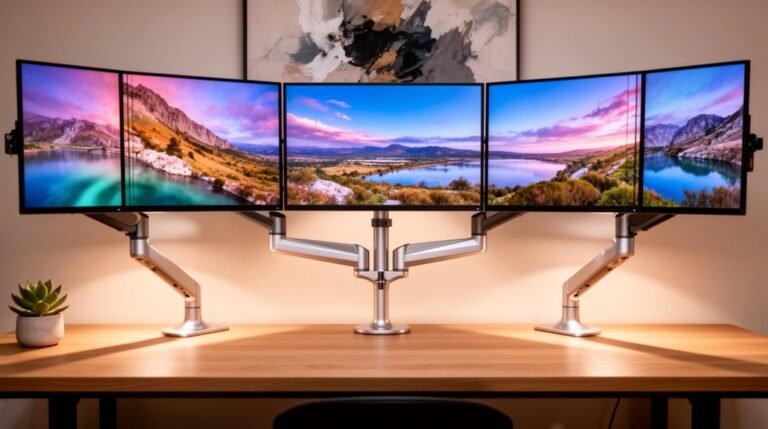
The HUANUO Triple Mount, WALI Free Standing Mount, WALI Triple Monitor Stand, VIVO Pneumatic Arm, and VIVO Premium Freestanding Desk Mount are the ultimate solutions for multi-monitor setups.
These triple monitor stands support a variety of monitor sizes and weights, providing excellent adjustability to suit your needs.
With different installation options available, you can choose the one that fits your workspace best.
Designed to enhance ergonomics and keep your space organized, these stands are perfect for professionals and gamers alike.
Stick around to discover more details about each standout option!
HUANUO Triple Monitor Mount for 17 to 32 inch Screens
If you’re looking to maximize your workspace with a versatile solution, the HUANUO Triple Monitor Mount is ideal for anyone using monitors between 17 to 32 inches. This mount fits monitors with VESA mounting holes and holds weights from 4.4 lbs to 17.6 lbs. By elevating three monitors off your desk, it creates a spacious, clutter-free workstation. You’ll appreciate the adjustability, allowing you to swivel, tilt, and rotate your screens for the best viewing angles. Choose between C-clamp or grommet installation methods to secure your setup based on your desk’s thickness. Enhance your comfort and productivity seamlessly with this mount!
Best For: Users looking to enhance their workspace efficiency with multiple monitors ranging from 17 to 32 inches.
Pros:
- Maximizes workspace by elevating monitors off the desk, creating a clutter-free environment.
- Adjustable features allow for optimal viewing angles with swivel, tilt, and rotation capabilities.
- Flexible installation options (C-clamp or grommet) cater to different desk thicknesses and user preferences.
Cons:
- Limited monitor size compatibility, only supporting monitors up to 32 inches.
- Weight restrictions may not accommodate heavier monitors beyond 17.6 lbs.
- Installation complexity could be a challenge for users unfamiliar with mounting equipment.
WALI Free Standing Triple Monitor Mount (MF003N)
For those looking to optimize their workspace, the WALI Free Standing Triple Monitor Mount (MF003N) stands out as an ideal choice. This mount supports 13-27 inch screens, holding up to 15.4 lbs each, and features universal compatibility with 75x75mm or 100x100mm mounting holes. Its sleek black design elevates monitors, maximizing desk space and minimizing clutter. With fully adjustable arms that tilt, swivel, and rotate, you’ll enjoy the perfect viewing angle. Plus, integrated cable management keeps wires hidden. Rated 4.4 stars from nearly 9,000 users, it’s a reliable option backed by a solid warranty and US-based support.
Best For: Those seeking an efficient and organized workspace with multiple monitors for enhanced productivity.
Pros:
- Fully adjustable arms allow for personalized viewing angles with tilt, swivel, and rotation features.
- Integrated cable management keeps desk space tidy and free from clutter.
- Sturdy steel frame ensures stability and durability during use.
Cons:
- May require some effort for assembly, as multiple components are involved.
- Limited to monitors within the 13-27 inch size range, which may not accommodate larger screens.
- Free-standing base may take up additional desk space compared to wall-mounted options.
WALI Triple Monitor Stand for Three LCD Monitors (MF003)
The WALI Triple Monitor Stand (MF003) is perfect for anyone needing a versatile mounting solution for three LCD or LED monitors up to 27 inches. It supports up to 22 lbs per arm and features detachable mount plates compatible with VESA 75x75mm or 100x100mm. You can choose between a free-standing V-Base or a grommet base for desks that are 0.3”-2.4” thick. With full height adjustment and adjustable tilting and swiveling capabilities, you can easily create an ergonomic workspace that reduces neck and eye strain. Plus, it includes a thorough hardware kit and US-based customer support available seven days a week.
Best For: The WALI Triple Monitor Stand is best for professionals and gamers who require an efficient and ergonomic setup for multiple monitors in homes, offices, or schools.
Pros:
- Supports up to three monitors with a maximum size of 27 inches and a weight of 22 lbs per arm.
- Versatile mounting options with a free-standing V-Base or grommet base for various desk thicknesses.
- Adjustable design promotes ergonomic positioning, reducing neck and eye strain.
Cons:
- Limited compatibility with monitors not adhering to VESA 75x75mm or 100x100mm standards.
- Installation may require tools and some technical knowledge, which could be challenging for some users.
- Height adjustment may not accommodate very tall users comfortably, depending on desk height and monitor size.
VIVO Pneumatic Arm Triple Ultrawide Monitor Desk Mount (STAND-V300D)
Designed for gamers and professionals who demand expansive screen real estate, the VIVO Pneumatic Arm Triple Ultrawide Monitor Desk Mount (STAND-V300D) supports a staggering combination of ultra-wide displays. It accommodates one 49-inch and two 38-inch monitors, featuring VESA 75x75mm or 100x100mm mounting holes. Each arm can hold between 5.5 lbs and 44 lbs, crafted from robust cast aluminum for durability. You’ll appreciate the pneumatic arms that allow effortless height adjustments with a simple touch. Plus, enjoy versatile articulation with +55° to -25° tilt, 180° swivel, and 360° rotation for ideal viewing angles. Assembly is a breeze with included instructions and hardware.
Best For: Gamers and professionals seeking an expansive and adjustable multi-monitor setup.
Pros:
- Supports a wide range of monitor sizes, accommodating one 49-inch and two 38-inch displays.
- Pneumatic arms allow for easy height adjustments with minimal effort.
- Offers versatile screen articulation with tilt, swivel, and rotation for optimal viewing angles.
Cons:
- May require a sturdy desk due to the weight capacity and size of the monitors.
- Installation may take time for those unfamiliar with VESA mounting systems.
- Limited to VESA 75x75mm or 100x100mm mounting holes, which may not fit all monitors.
VIVO Premium Freestanding Triple Monitor Desk Mount (STAND-TS03F)
If you’re looking to maximize your desktop space while supporting up to three monitors, the VIVO Premium Freestanding Triple Monitor Desk Mount (STAND-TS03F) is an ideal choice. It supports up to three screens, each weighing up to 22 lbs, and accommodates various setups, including ultrawide configurations. With a unique telescoping arm design, you can achieve a flush-to-wall look. The mount offers extensive adjustability, allowing for tilt, swivel, rotation, and height adjustments. Installation is a breeze with detachable VESA brackets and included hardware, ensuring a stable setup without drilling into your desk. Elevate your workspace effortlessly with this versatile mount!
Best For: Users looking to optimize their workspace with multiple monitor setups for enhanced productivity and organization.
Pros:
- Supports up to three monitors, accommodating various sizes and configurations.
- Telescoping arm design allows for a clean, flush-to-wall setup, saving desk space.
- Extensive adjustability options for tilt, swivel, rotation, and height to suit individual preferences.
Cons:
- May not be suitable for monitors heavier than 22 lbs each.
- Installation requires some manual effort, despite the included instructions and hardware.
- The freestanding base may take up additional desk space compared to wall-mounted options.
Factors to Consider When Choosing Triple Monitor Stands
When you’re choosing a triple monitor stand, consider factors like monitor size compatibility and weight capacity limits to guarantee a proper fit. You’ll also want to think about adjustability and installation methods, as well as how efficiently the stand uses your workspace. These elements can greatly impact your setup and overall productivity.
Monitor Size Compatibility
Choosing the right triple monitor stand hinges on understanding monitor size compatibility. You’ll find stands designed for various monitor sizes, from 13 inches up to 49 inches. It’s essential to check if your monitors have VESA mounting holes, usually 75x75mm or 100x100mm, to guarantee a secure fit. Some stands only support monitors up to 27 inches, so make sure you select one that matches your display dimensions. Additionally, consider the stand’s ability to adjust monitor orientation and height, especially for larger or heavier screens. This flexibility can greatly enhance usability, allowing you to create an ergonomic and efficient workspace tailored to your needs. Always verify individual specifications to confirm compatibility with your specific monitors.
Weight Capacity Limits
Understanding weight capacity limits is vital for guaranteeing your triple monitor stand can safely support your displays. When you’re selecting a stand, check that the weight capacity typically ranges from 4.4 lbs to 22 lbs per monitor, depending on the design. It’s important that the total weight of your monitors doesn’t exceed the stand’s maximum limit to maintain stability and safety. Each arm has its individual weight limit, so pay attention to these specifications to avoid damage. If you have larger or ultra-wide displays, look for stands that can accommodate weights up to 44 lbs per arm. Always verify your monitors’ compatibility with the stand’s weight range to confirm peak performance and longevity.
Adjustability and Flexibility
Adjustability and flexibility are essential factors in selecting a triple monitor stand that meets your needs. Look for stands with multiple articulation features like tilt, swivel, and rotation, enabling you to find the perfect viewing angles while reducing glare. Adjustable height mechanisms, either pneumatic or manual, enhance ergonomics by positioning your monitors at eye level, minimizing neck and eye strain. Flexibility in monitor orientation, supporting both landscape and portrait modes, allows you to personalize your setup based on specific tasks. Additionally, consider stands with fully adjustable arms that can extend or retract, accommodating various screen sizes and configurations. Guarantee compatibility with VESA mounting standards (75x75mm or 100x100mm) for easy adjustments and a wide range of monitor options.
Installation Methods Available
When setting up your triple monitor stand, the installation method plays a significant role in ensuring a stable and secure workspace. You’ll typically find multiple options, like C-clamp and grommet mounts, catering to different desk thicknesses and personal preferences. C-clamp mounts work well for desks ranging from 0.39 to 3.15 inches thick, while grommet mounts are ideal for thinner surfaces, up to 2.36 inches. If you prefer not to drill into your desk, a free-standing base lets you set the mount on any flat surface. Choosing the right installation method not only guarantees monitor stability during use but also enhances safety. Some stands even come with integrated cable management systems, keeping your workspace organized and visually appealing.
Space Efficiency Considerations
Choosing the right triple monitor stand can drastically improve your workspace’s efficiency. These stands elevate your monitors off the desk, freeing up valuable surface area and creating a clutter-free environment. By utilizing vertical space, you can notably reduce your desk’s footprint, making them perfect for smaller areas. Look for models with integrated cable management systems; they help hide wires, resulting in a more organized appearance. Adjustable designs, such as tilting and swiveling options, allow you to optimize monitor placement without taking up extra horizontal space. Finally, selecting a stand with a sturdy base or clamping mechanism guarantees stability while preserving precious desk space, contributing to a more streamlined and efficient workspace.
Build Quality and Durability
Build quality and durability are essential factors to take into account in your search for the ideal triple monitor stand. Look for stands made from heavy-duty materials like steel or cast aluminum, ensuring long-lasting strength. It’s vital to reflect on the weight capacity; high-quality stands should support various monitor weights, typically between 4.4 lbs to 44 lbs per arm. Stability is key, so check for features like a solid base or grommet mount options. Pay attention to the quality of joints and articulation points; well-engineered mechanisms should allow smooth adjustments without sacrificing stability. Finally, opt for models that come with a warranty or reliable customer support, as these reflect the manufacturer’s confidence in their product’s durability.
Cable Management Features
A sturdy triple monitor stand not only enhances your workspace’s organization, but it also plays a significant role in managing cables effectively. Look for stands with integrated channels or clips that keep wires organized and reduce desk clutter. Some models feature built-in cable management systems, allowing you to route and conceal cables easily, which boosts both aesthetics and functionality. A well-designed cable management system prevents tangling and damage, extending the lifespan of your equipment. Plus, these options let you adjust monitor positions without disrupting your wiring setup. Proper cable management also improves airflow around your monitors, helping to prevent overheating and maintain peak performance, ensuring your workspace stays efficient and tidy.
Frequently Asked Questions
Will a Triple Monitor Stand Fit My Desk Size?
Yes, a triple monitor stand can fit your desk size, but you’ll need to measure your desk‘s width and depth first. Most stands require a minimum width, so check the specifications of the stand you’re considering. Confirm your monitors also fit comfortably on the stand. If space is tight, consider a clamp mount style, which can free up desk space while providing a sturdy setup for your monitors.
Can I Use a Triple Monitor Stand With Curved Screens?
Yes, you can use a triple monitor stand with curved screens. Just verify the stand supports the weight and size of your monitors. Most stands are adjustable and designed to accommodate various screen shapes, including curved ones. When setting it up, confirm your monitors are securely mounted and positioned for ideal viewing angles. This way, you’ll enjoy a seamless and immersive experience while working or gaming on your curved displays.
How Do I Ensure Stability for My Monitors?
To guarantee stability for your monitors, you can start by using a heavy-duty triple monitor stand designed for the weight and size of your screens. Picture yourself setting up a stand that supports 32-inch curved monitors; you’ll want to secure it to your desk with clamps or screws. Also, adjust the height and angle properly to distribute weight evenly, preventing wobbling. This way, you’ll enjoy a sturdy and reliable workspace every day.
Are There Warranty Options for These Monitor Stands?
Yes, many monitor stands come with warranty options. When you’re shopping, check the product details for warranty information. Most reputable brands offer at least a one-year warranty, covering defects in materials and workmanship. If you’re investing in a high-quality stand, look for extended warranties that provide additional peace of mind. Don’t hesitate to reach out to customer service for clarification on warranty terms before making your purchase.
Can I Mount Different Monitor Brands on the Same Stand?
Yes, you can mount different monitor brands on the same stand, as long as they meet the VESA mounting standards. Most stands are designed to accommodate various sizes and weights, so check the specifications of your stand to verify compatibility. Just make sure the monitors are stable and evenly balanced for ideal performance. Mixing brands can add a unique touch to your workspace while maintaining functionality and efficiency.
Conclusion
When it comes to boosting your workspace efficiency, investing in a quality triple monitor stand makes a real difference. You might worry about the setup being complicated, but most options are designed for easy installation, so you can focus on your tasks instead of struggling with hardware. With the right stand, you’ll enjoy better ergonomics and a more organized desk. So go ahead and elevate your work experience—your productivity will thank you!