5 Best Gas-Spring Monitor Arms to Elevate Your Workspace Comfort and Efficiency
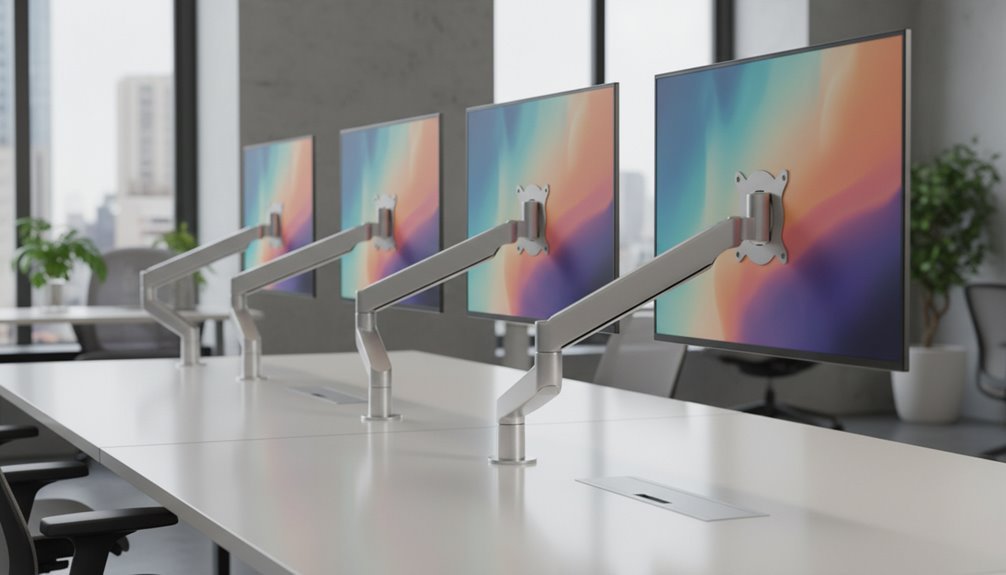
To elevate your workspace comfort and efficiency, consider investing in gas-spring monitor arms.
Top options include the WALI Single Monitor Mount, ARES WING Ultrawide Monitor Arm, HUANUO Single Monitor Mount, Suptek Fully Adjustable Gas Spring Arm, and WALI Ultrawide Monitor Arm.
Each of these arms offers impressive adjustability, capable of supporting various screen sizes and weights while enhancing ergonomics.
By utilizing these gas-spring monitor arms, you can achieve a better viewing experience, ultimately reducing neck and eye strain.
If you’re interested in further details about each option, there’s plenty more to explore.
WALI Single Monitor Mount, Gas Spring Monitor Arm for 17-34 inch Screens
If you’re looking to enhance your workspace with flexibility and comfort, the WALI Single Monitor Mount is an excellent choice for anyone using 17-34 inch screens. With a maximum load capacity of 26.4 lbs for flat screens and 19.8 lbs for curved ones, it fits most setups easily. You’ll appreciate its full adjustability, allowing you to swivel, tilt, and rotate your monitor for ideal viewing angles. The ergonomic design reduces neck and eye strain, promoting better posture. Plus, installation’s a breeze with clamp or grommet options. Enjoy reliable support with US-based customer service available seven days a week.
Best For: Those seeking an ergonomic and adjustable solution for mounting 17-34 inch monitors to enhance workspace comfort.
Pros:
- Full adjustability with swivel, tilt, and rotation for optimal viewing angles.
- Ergonomic design reduces strain on neck, eyes, and back.
- Easy installation with two mounting methods and included support.
Cons:
- Maximum load capacity may not support heavier monitors.
- May require some adjustment after initial setup for perfect positioning.
- Limited compatibility with non-standard monitor mounts.
ARES WING Ultrawide Monitor Arm for 17 to 49 Inch Screens
The ARES WING Ultrawide Monitor Arm is the ideal choice for gamers and professionals who use ultrawide monitors ranging from 17 to 49 inches. It supports up to 44 lbs and is compatible with popular models like the Samsung Odyssey G9 and LG, requiring a VESA mount adapter for non-VESA screens. You’ll appreciate its flexibility, with +50° to -20° tilt, 180° swivel, and 360° rotation, ensuring you find the perfect angle. Installation is a breeze with C-clamp or grommet mount options, and built-in cable management keeps your workspace tidy. Enjoy optimal ergonomic posture and a clutter-free desk!
Best For: Gamers and professionals using ultrawide monitors from 17 to 49 inches looking for an ergonomic and space-saving solution.
Pros:
- Excellent adjustability with multiple tilt, swivel, and rotation options for optimal viewing angles.
- High-quality build from steel and aluminum, ensuring durability and long-term use.
- Easy installation with two mounting methods and built-in cable management for a tidy workspace.
Cons:
- Requires a VESA mount adapter for non-VESA monitors, which may be an additional cost.
- Maximum weight capacity of 44 lbs may limit usage with heavier monitor models.
- Larger monitors may require more desk space despite the arm’s space-saving design.
HUANUO Single Monitor Mount (Fits 13 to 32 Inch Monitors)
For those seeking an ergonomic solution to enhance their workspace, the HUANUO Single Monitor Mount is an excellent choice. It accommodates monitors from 13 to 32 inches, supporting weights between 4.4 and 19.8 lbs. The gas spring arm allows effortless adjustments, with a tilt range of -50° to +30°, swivel of ±90°, and 360° rotation. You can lift your screen up to 39.6 cm with one hand, ensuring ideal viewing comfort. Plus, its sturdy design is 80% stronger than competitors, and installation takes just three minutes. Enjoy more desktop space and comfort by upgrading to the HUANUO mount today!
Best For: Individuals seeking an ergonomic and space-efficient solution for their workspace with compatible monitors ranging from 13 to 32 inches. When considering the best monitor arms for triple displays, it’s crucial to assess their adjustability and stability to ensure optimal ergonomics. Additionally, those looking to enhance their productivity should evaluate the range of motion offered by these arms, allowing for seamless transitions between tasks. Investing in high-quality monitor arms can significantly improve your overall workspace experience.
Pros:
- Easy adjustments: Gas spring arm allows for effortless tilt, swivel, and rotation to achieve optimal viewing angles.
- Space-saving design: C-clamp or grommet mounting frees up over 80% of desktop space compared to traditional monitor stands.
- Quick installation: Simple one-piece design with all necessary hardware enables setup in just three minutes.
Cons:
- Limited weight capacity: Only supports monitors weighing between 4.4 and 19.8 lbs, which may not accommodate heavier models.
- VESA compatibility: Must have a compatible VESA pattern (75x75mm or 100x100mm) to ensure proper fit.
- Initial tension adjustment: May require initial tension adjustments for optimal performance, which can be a bit tricky for first-time users.
Suptek Fully Adjustable Gas Spring Monitor Arm Desk Mount
Looking for a monitor arm that adapts to your workspace needs? The Suptek Fully Adjustable Gas Spring Monitor Arm Desk Mount is just what you need. It supports monitors from 17 to 32 inches, with a weight capacity of up to 22 lbs. This arm offers impressive adjustability, extending up to 22.24 inches and adjusting in height by 15.74 inches, ensuring you maintain ideal posture. With full motion capabilities like 360° rotation and ±80° tilt, you can easily customize your viewing angle. Plus, it installs effortlessly with either a C-clamp or grommet base, making it a versatile choice for any desk.
Best For: Individuals seeking a versatile and fully adjustable monitor arm to enhance their workspace ergonomics.
Pros:
- Fully adjustable: Extends up to 22.24 inches and offers a height adjustment of 15.74 inches for optimal viewing angles.
- Full motion capabilities: Features 360° rotation, ±80° tilt, and ±180° swivel for customizable positioning.
- Easy installation: Can be mounted using a C-clamp or grommet base, accommodating desks up to 3.85 inches thick.
Cons:
- Weight limit: Maximum weight capacity of 22 lbs may not support heavier monitors.
- Compatibility constraints: Only suitable for monitors with 75x75mm or 100x100mm mounting holes.
- Gas spring durability: While tested for durability, gas springs may require maintenance or replacement over time.
WALI Ultrawide Monitor Arm for 13 to 49 Inch Screens (GSM001XL)
Designed to support ultrawide monitors up to 49 inches, the WALI Ultrawide Monitor Arm (GSM001XL) is perfect for professionals, remote workers, and students seeking an ergonomic setup. It easily accommodates monitors up to 35 inches and handles up to 33 lbs. With +45°/-45° tilt, +90°/-90° swivel, and 180° rotation, you can customize your viewing angle to reduce neck strain and eye fatigue. Installation is straightforward, thanks to the included C-clamp and grommet mounts for various desk thicknesses. Plus, the built-in cable management keeps your workspace tidy, ensuring both stability and style in your setup.
Best For: The WALI Ultrawide Monitor Arm is best for professionals, remote workers, and students seeking an ergonomic workspace solution for large monitors.
Pros:
- Supports a wide range of monitor sizes, accommodating ultrawide monitors up to 49 inches and standard monitors up to 35 inches.
- Offers extensive adjustability with tilt, swivel, and rotation features, enhancing ergonomic comfort and reducing strain.
- Durable construction ensures long-lasting stability, having passed over 20,000 fatigue tests.
Cons:
- Installation may be challenging for beginners despite provided instructions, especially for those unfamiliar with mounting hardware.
- Limited weight capacity of 33 lbs may not support heavier monitors or additional accessories.
- C-clamp and grommet mounts may not be compatible with all desk types, potentially limiting installation options.
Factors to Consider When Choosing Gas-Spring Monitor Arms
When choosing gas-spring monitor arms, you need to take into account several important factors. Make certain the arm is compatible with your monitor size and can support its weight. Additionally, look at the adjustability features, installation methods, and overall build quality to guarantee durability.
Monitor Size Compatibility
Choosing the right gas-spring monitor arm hinges on understanding monitor size compatibility. You’ll find that most models support a range of monitors, typically from 13 inches up to 49 inches. It’s crucial to check the VESA mounting standards, with common patterns like 75x75mm and 100x100mm, to guarantee a proper fit for your monitor brand. Also, consider whether your monitor is flat or curved, as this can impact stability and load capacity. Additionally, think about the arm’s extension and height adjustment features; these can greatly enhance ergonomic positioning, especially for larger screens. By carefully evaluating these factors, you can make sure your workspace remains comfortable and efficient.
Weight Capacity Requirements
After ensuring your monitor’s size is compatible with the gas-spring arm, the next step involves understanding weight capacity requirements. Make sure the arm’s weight limit matches or exceeds your monitor’s weight, which typically ranges from 4.4 lbs to 44 lbs. Pay attention to specific limits, like 26.4 lbs for flat screens and 19.8 lbs for curved screens, as these are essential for stability. Consider the weight distribution, too; some designs might need a lower maximum weight to avoid tipping. Also, check the construction materials and whether they’ve been fatigue tested for durability. High-quality arms can support monitors for over five years. Finally, confirm VESA compatibility to match your monitor’s mounting hole specifications, usually 75x75mm or 100x100mm.
Adjustability Features Offered
A gas-spring monitor arm can greatly enhance your workspace by offering exceptional adjustability features. These arms typically provide a wide range of motion, including tilt, swivel, and rotation, allowing you to achieve ideal viewing angles. With tilt ranges of +70° to -45° or ±90°, you can easily adjust for comfort. Height adjustments often span from 8.7 to 18.7 inches, ensuring your monitor is at the perfect ergonomic level. Some models extend up to 22.4 inches from the mounting point, giving you flexibility in positioning. Full motion capabilities include 360° rotation and ±180° swivel, making it simple to switch between landscape and portrait modes. Overall, these features help reduce strain on your neck, eyes, and back.
Installation Methods Available
When enhancing your workspace with a gas-spring monitor arm, the installation method can greatly impact your overall experience. You’ll typically find two primary options: C-clamp and grommet mounts. C-clamp mounts are perfect if your desk is between 0.5 to 2 inches thick, allowing for a quick, drill-free attachment. On the other hand, grommet mounts require a drilled hole but can fit desks up to 3.85 inches thick, providing enhanced stability for heavier monitors. Most gas-spring monitor arms come with straightforward manuals and organized hardware kits to make setup a breeze. Plus, some models include detachable VESA plates, letting you easily attach and detach your monitor without uninstalling the entire arm. Choose the method that best suits your desk and needs!
Build Quality and Durability
Choosing a gas-spring monitor arm with solid build quality guarantees you get the durability and performance you need for your workspace. Look for models that have undergone rigorous durability testing, ideally for 20,000 motion cycles, to confirm they last. High-quality materials like steel and aluminum enhance stability, supporting heavier screens, often up to 44 lbs. A fatigue-tested internal mechanism means consistent performance and easy adjustments over time. You want a sturdy design that can handle regular tweaks without losing structural integrity, ideally surpassing industry standards. Finally, consider warranties that reflect the manufacturer’s confidence in their product; a solid guarantee often indicates a higher build quality and assurance of long-term reliability.
Cable Management Options
Solid build quality is only part of the equation in creating an efficient workspace; effective cable management is equally important for maintaining a clean and organized environment. Look for gas-spring monitor arms with built-in cable management systems that guide and conceal cables along the arm or behind the monitor. Many models also offer adjustable clips or channels, allowing you to customize cable routing to fit your specific setup. Proper cable management not only enhances the aesthetics of your workspace but also improves accessibility, making it easier to unplug or replace cables when needed. Plus, a well-organized cable system contributes to a safer work environment by minimizing trip hazards associated with loose cables on your desk.
Frequently Asked Questions
How Do I Install a Gas-Spring Monitor Arm?
To install a gas-spring monitor arm, start by attaching the mounting bracket to your desk using the provided screws and tools. Make sure it’s secure. Then, connect the arm to the bracket according to the instructions. Adjust the gas-spring tension by turning the knob until it holds your monitor at the desired height. Finally, attach your monitor to the arm securely, ensuring it’s level and stable. You’re all set to enjoy your new setup!
Are Gas-Spring Monitor Arms Compatible With All Desk Types?
Gas-spring monitor arms are like chameleons, adapting to various desk types with ease. Most of them fit desks with standard thicknesses, whether they’re solid wood, particleboard, or metal. However, if your desk has a unique design or unusual surface, you’ll want to check compatibility. Some models come with clamps or grommets, while others might require extra mounting hardware. So, make sure to measure and assess before you plunge into the installation!
Can I Use a Gas-Spring Arm for Dual Monitors?
Yes, you can definitely use a gas-spring arm for dual monitors! Many gas-spring monitor arms are designed specifically for this purpose, allowing you to adjust both screens effortlessly. Just make sure the arm you choose supports the weight and size of your monitors. You’ll enjoy enhanced ergonomics and workspace flexibility, making it easier to switch between tasks. Plus, it’ll help keep your desk organized and clutter-free!
What Is the Average Lifespan of a Gas-Spring Monitor Arm?
Most gas-spring monitor arms last between 5 to 10 years, depending on usage and quality. Curiously, a well-maintained gas-spring arm can retain up to 90% of its initial performance even after several years. You’ll find that regular adjustments and keeping the arm clean can greatly extend its lifespan. Investing in a quality product can make a noticeable difference, ensuring your workspace remains comfortable and efficient for years to come.
Do Gas-Spring Monitor Arms Require Regular Maintenance?
Yes, gas-spring monitor arms do require some regular maintenance to guarantee they function smoothly. You’ll want to check for any wear or damage periodically, and if you notice any issues, it’s best to address them quickly. Most importantly, keep the joints clean and free of dust or debris to maintain fluid movement. It’s also a good idea to occasionally adjust the tension to match your preferences, enhancing your comfort while working.
Conclusion
In today’s fast-paced world, a gas-spring monitor arm is like having a personal assistant for your workspace. It adjusts to your needs, boosting your comfort and productivity. Imagine effortlessly shifting your screen’s position as if you’re fine-tuning a musical instrument—each adjustment creating a perfect harmony between your eyes and the monitor. Investing in one of these mounts isn’t just about convenience; it’s about transforming your workspace into a symphony of efficiency and comfort.